 fusen
fusenLook up Japanese words in ReadEra
ReadEra's Translate button sends the text you select to the app you choose as its translator. Choose Fusen once, and every sentence you select in a Japanese book opens in Fusen's popup, on top of the page, ready for you to tap the word you want.
Tested with ReadEra 26.09.29 (Premium) and 26.05.20 (free) and Fusen 1.0.1 on Android 15. Updated .
Before you start
- Install Fusen and, when it asks, download the dictionary (JMdict, about 11 MB). After that, lookups work offline.
- Install ReadEra and open a Japanese EPUB in it. The free version works the same as Premium.
Set up ReadEra once
Tell ReadEra to use Fusen as its translator. You only do this once.
In a book, long-press a word. ReadEra's menu should read Copy · Quote · Translate · Dictionary · More. If it only has Copy · Quote · More, tap More → CUSTOMIZE and choose Advanced.
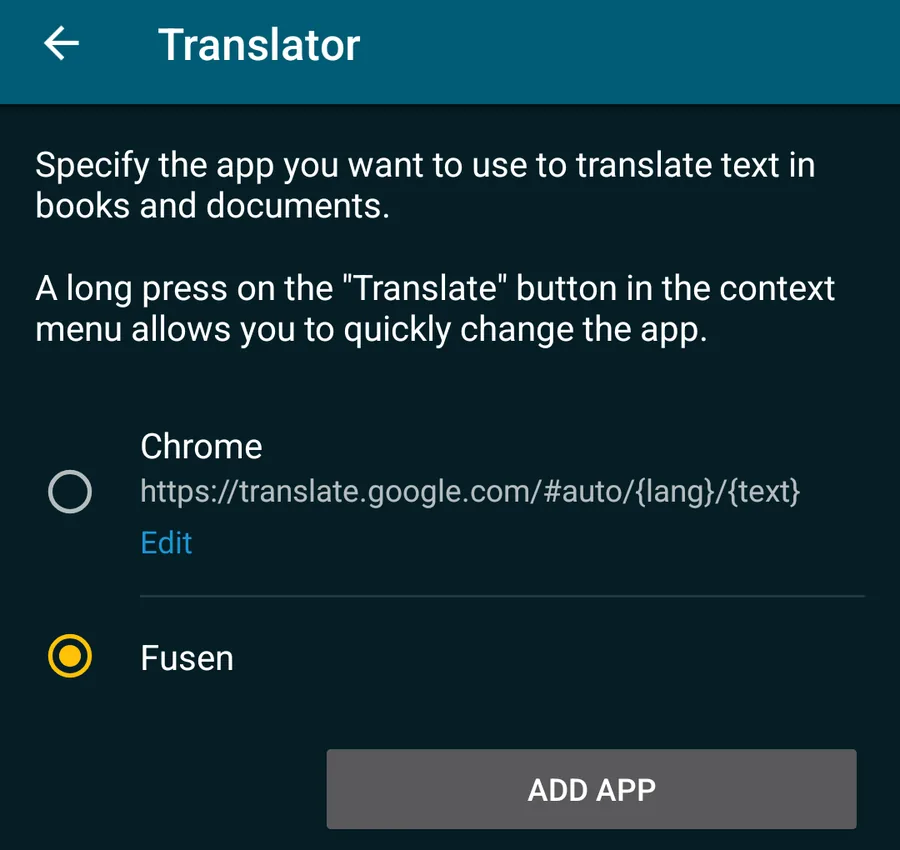
Tap More → CUSTOMIZE. On the Context menu screen, tap Translator, then ADD APP.
Tick Fusen in Available apps and go back. Fusen is now in the Translator list: tap it, so it is the selected translator.
The same setting is also in ReadEra's Settings → Translator, Dictionary, Web Search.
Look up a word
Long-press the first word of the sentence. ReadEra selects a short phrase (一人の下人が); drag the end handle to the end of the sentence.
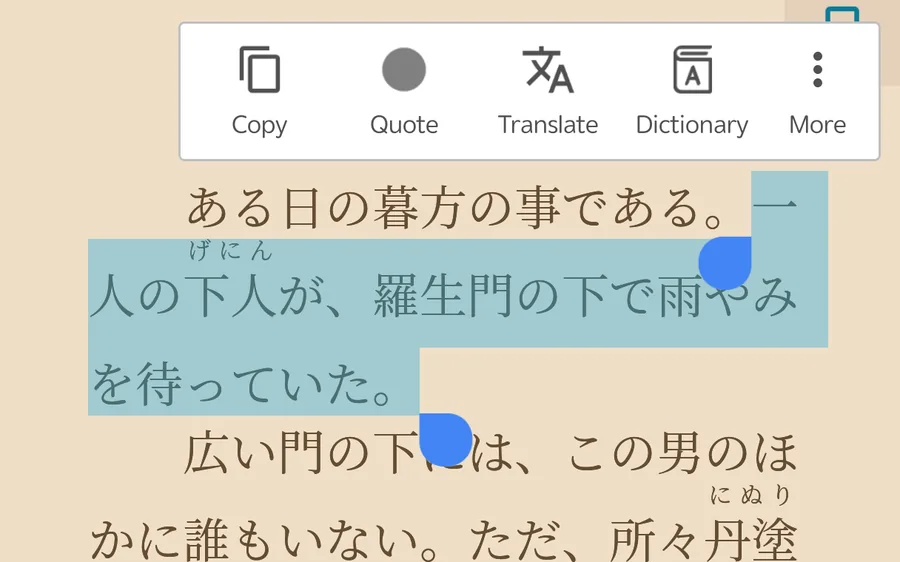
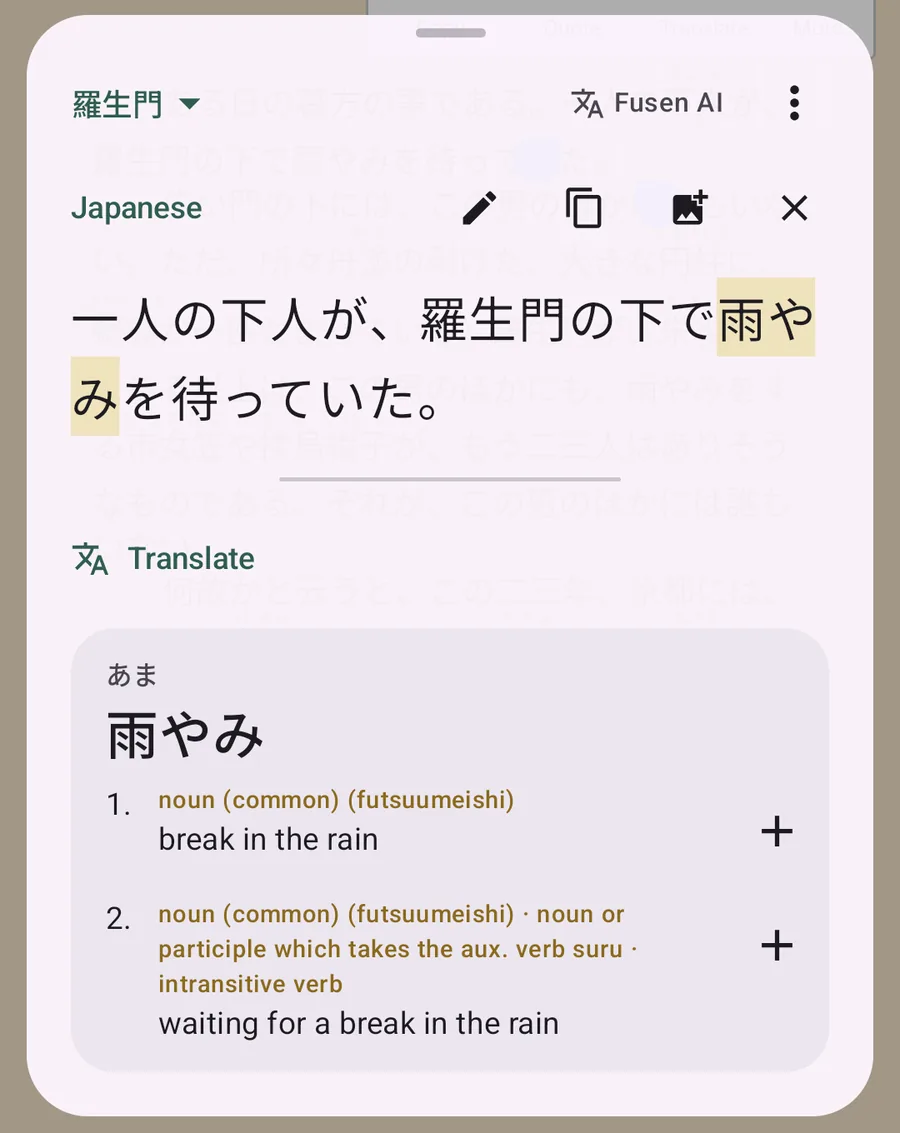
Tap Translate. Fusen's popup opens over the book with the sentence you selected. Tap any word in it to see its dictionary entry; conjugated verbs and adjectives are traced back to their dictionary form.
Tap + beside a meaning to save the word to your notebook, with this sentence. Close the popup (× or Back) and you are back on the same page.
Vertical books (縦書き)
ReadEra lays out vertical Japanese books properly, and selecting works the same way: long-press, then drag the end handle down the column. Tap Translate as before.
Good to know
- Select the sentence, not just the word. Fusen saves whatever you sent as the word's sentence. Sending the whole sentence and tapping the word in the popup gives you both a correct lookup and a useful example.
- Furigana are dropped. ReadEra sends ruby readings inline after their kanji, as in 下人(げにん). Fusen removes them, so the popup shows 一人の下人が. Readings come from the dictionary instead.
- Switch translators quickly. A long-press on Translate lets you pick another translator app, and back to Fusen.
- Other ways in. More → SHARE → Fusen lookup works with no setup. Copy works with Fusen's floating Lookup button: turn it on in Fusen with Settings → Behavior → Floating button, copy the text in ReadEra, then tap the button.
- Why Translate, not Dictionary? Translate is the button we tested with Fusen. ReadEra's Dictionary button sends to the app chosen under Dictionary on the same Context menu screen; we haven't tried it with Fusen.
- One collection per book. Tap the collection name at the top left of the popup (Inbox at first), choose New collection… and name it after the book. Words you save go there, and the popup stays on that collection until you change it.
- Translate and explain. The popup's Translate translates the sentence, and Explain with AI explains the word in this context. Both use Fusen AI, with free monthly credits on a free Fusen account; the dictionary itself never uses credits.
- Translate opens another app? Fusen isn't the selected translator. Choose it as in Set up ReadEra once, or long-press Translate and pick Fusen.