 fusen
fusenWhich Android app for reading Japanese books?
Seven common ways to read Japanese books on Android, compared on what matters to learners: vertical layout, furigana, supported file formats, and whether an external dictionary can be called up while you read. All results come from testing the same Japanese EPUB.
Tested in October 2026 on Android 15 and 16; app versions are in the table. Updated .
The short answer
- EPUB novels, vertical ones too: Readest or ReadEra. Both show 縦書き and furigana, and both send a selection to a dictionary app in one tap.
- PDFs and comic files with text: Librera. It shows vertical EPUBs as well.
- Already reading in Moon+ Reader or KOReader: both work with a dictionary app, but lay vertical books out horizontally.
- Web novels: Chrome on 小説家になろう and カクヨム. No app needed.
- Books bought on Google Play: Play Books shows them well but can't send text to another app, so copy the sentence instead.
The comparison
External dictionary is how a selection reaches a separately installed dictionary app.
| App | Vertical (縦書き) | Furigana | External dictionary | Cost |
|---|---|---|---|---|
| Readest 0.12.16 | ✓ | ✓ | Dictionary button | Free, open source |
| ReadEra 26.09.29 | ✓ | ✓ | Translate button, Share | Free, paid Premium |
| Librera 10.0.7 | ✓ | ✓ | Dictionary row, Share | Free with ads, paid PRO |
| Moon+ Reader 10.8 | ✗ | ✓ | Dict. button, More, Share | Free with ads, paid Pro |
| KOReader v2026.07.1 | ✗ | ✓ | Share only | Free, open source |
| Chrome 133 | — | ✓ | ⋮ menu, Share | Free |
| Google Play Books 2026.9.18 | ✓ | ✓ | ✗ (copy only) | Free |
Moon+ Reader and KOReader show vertical books horizontally; both web-novel sites are horizontal on phones anyway. Setup steps for each app are in the notes below.
File formats
| App | EPUB | MOBI / AZW3 | CBZ | CBR | TXT | |
|---|---|---|---|---|---|---|
| Readest | ✓ | ✓ | ✓ | ✓ | ✗ | ✓ |
| ReadEra | ✓ | ✓ | ✓ | Premium | Premium | ✓ |
| Librera | ✓ | ✓ | ✓ | ✓ | ✓ | ✓ |
| Moon+ Reader | ✓ | ✓ | ✓ | ✓ | ✓ | ✓ |
| KOReader | ✓ | ✓ | MOBI | ✓ | ✗ | ✓ |
| Play Books | ✓ | ✓ | ✗ | ✗ | ✗ | ✗ |
From each app's Google Play listing or documentation. Play Books opens your own EPUB and PDF files once uploaded to your Google account; Chrome reads web pages, not files.
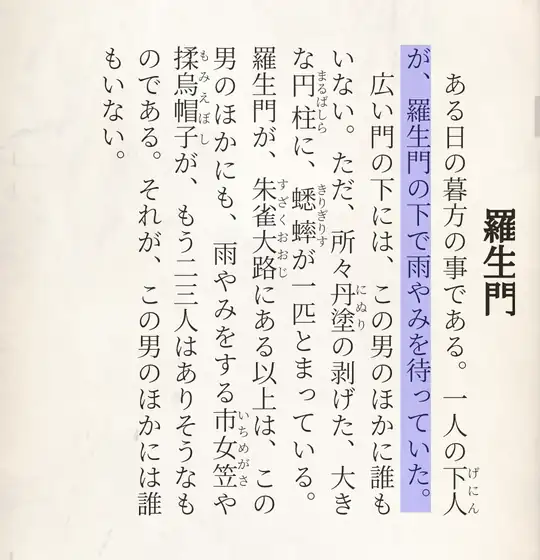
Notes on each app
Readest
Open source, and also on iOS and computers. Turn on System Dictionary once, and its Dictionary button sends the selection to the dictionary app you pick. Its own lookup uses Wiktionary and Wikipedia, and its README says you can import Yomitan dictionaries too (we didn't try that). Furigana are left out of what you select. Reading is free; paid plans add cloud storage, DeepL translation and AI read-aloud. Set up Readest with Fusen.
ReadEra
No ads and no account. Make Fusen its translator once (More → Customize → Translator), and the Translate button sends the selection there. ReadEra sends furigana inline after the kanji, as in 下人(げにん); Fusen removes them. The paid ReadEra Premium adds comic files (CBZ, CBR), background read-aloud and page thumbnails, among other things. Set up ReadEra with Fusen.
Librera
Opens almost any file, including PDF, DjVu and comic archives. Add Fusen to its dictionary row once with +. A long-press selects a whole line and takes the furigana with it (下人 げにん), so trim the text in its box before sending. We tested Librera FD from F-Droid; the Google Play version is the same reader with ads. Set up Librera with Fusen.
Moon+ Reader
Its Dict. button reaches Fusen with no setup, because Fusen answers as a ColorDict-style dictionary, and More lists Fusen too. Vertical EPUBs are laid out horizontally, and we found no setting to change that. Furigana are left out of what you select. Use Moon+ Reader with Fusen.
KOReader
Open source and made for e-ink readers, and on Android from GitHub or F-Droid rather than Google Play. A long-press opens its own dictionary (StarDict format). To reach Fusen, drag over a sentence and tap Share Text: its external-dictionary setting lists only apps it already knows. Vertical EPUBs are laid out horizontally. Use KOReader with Fusen.
Chrome
For web novels, no reading app is needed. On 小説家になろう and カクヨム, select a sentence and tap ⋮ → Fusen lookup in Chrome's selection bar. Both sites lay chapters out horizontally on phones. Read Syosetu and Kakuyomu with Fusen.
Google Play Books
Shows vertical text and furigana well, and opens your own EPUB and PDF files once you upload them to your Google account. Its selection menu (Add note, Define, Translate, Copy, Search) keeps everything inside Play Books, so text can't go to another app directly. Instead, turn on Fusen's floating Lookup button (Settings → Behavior → Floating button), select a sentence, tap Copy, then tap the button: the popup opens with the copied text. Play Books copies furigana inline (下人 げにん が), and Fusen keeps them, so tap the word you want.
Kindle, BOOK☆WALKER and Kobo
Not tested yet: each needs its own account, and they will be added here once they are. Two things hold in any reading app. If it lets you select and copy text, copy the sentence and tap Fusen's floating Lookup button. If it doesn't, the same button's Read the screen reads the page with Fusen AI, as it does for manga, provided the app allows screenshots.
How we tested
In October 2026, on Android 15 and 16, with two small EPUBs made from 芥川龍之介『羅生門』, which is in the public domain: one horizontal and one vertical, with ruby on words like 下人 and 蟋蟀. Each app opened both books; we checked how it laid them out, then selected a sentence and sent it to Fusen every way the app offers. File formats and costs come from each app's Google Play listing or website as of 30 October 2026.
Fusen, the popup dictionary these guides connect to the readers, is ours. None of the readers is, and none paid to be listed.
Apps change with every update, and these results hold for the versions tested. If you find anything that no longer matches, email support@fusen.ink and we will check it and update the page.
Questions
Which Android reader shows vertical Japanese text?
Readest, ReadEra, Librera and Google Play Books, in our tests. Moon+ Reader and KOReader lay vertical books out horizontally.
Which ones show furigana?
All seven showed the ruby in our test book. They differ in what happens to the readings when you select text: Readest and Moon+ Reader leave them out, while ReadEra, Librera and Play Books put them inline after the kanji.
Can I use a dictionary app in Kindle?
We haven't tested Kindle yet. See Kindle, BOOK☆WALKER and Kobo for what works in any app.
Do I have to pay?
No. Every app here can be used free; Moon+ Reader and Librera's Google Play version show ads. Fusen's dictionary is free too, and only Fusen AI uses credits.